Everything You Need to Know About the New & Improved PheedLoop Registration System
Everything You Need to Know About the New & Improved PheedLoop Registration System
PheedLoop's new registration system introduces a cleaner, more intuitive registration experience, particularly for group registrations. This article covers the key updates, including how to opt in from your Event Dashboard, changes to your registration settings, and what registrants can expect from the updated process.
The new system is currently available on an opt-in basis, allowing you to continue using the existing system until you're ready to upgrade.
*Video walkthrough and demo*
Key Transition Dates at a Glance
To ensure zero disruption to your events, the rollout will happen in stages:
October 1, 2026 — New Registration Launch & Self-Serve Transition
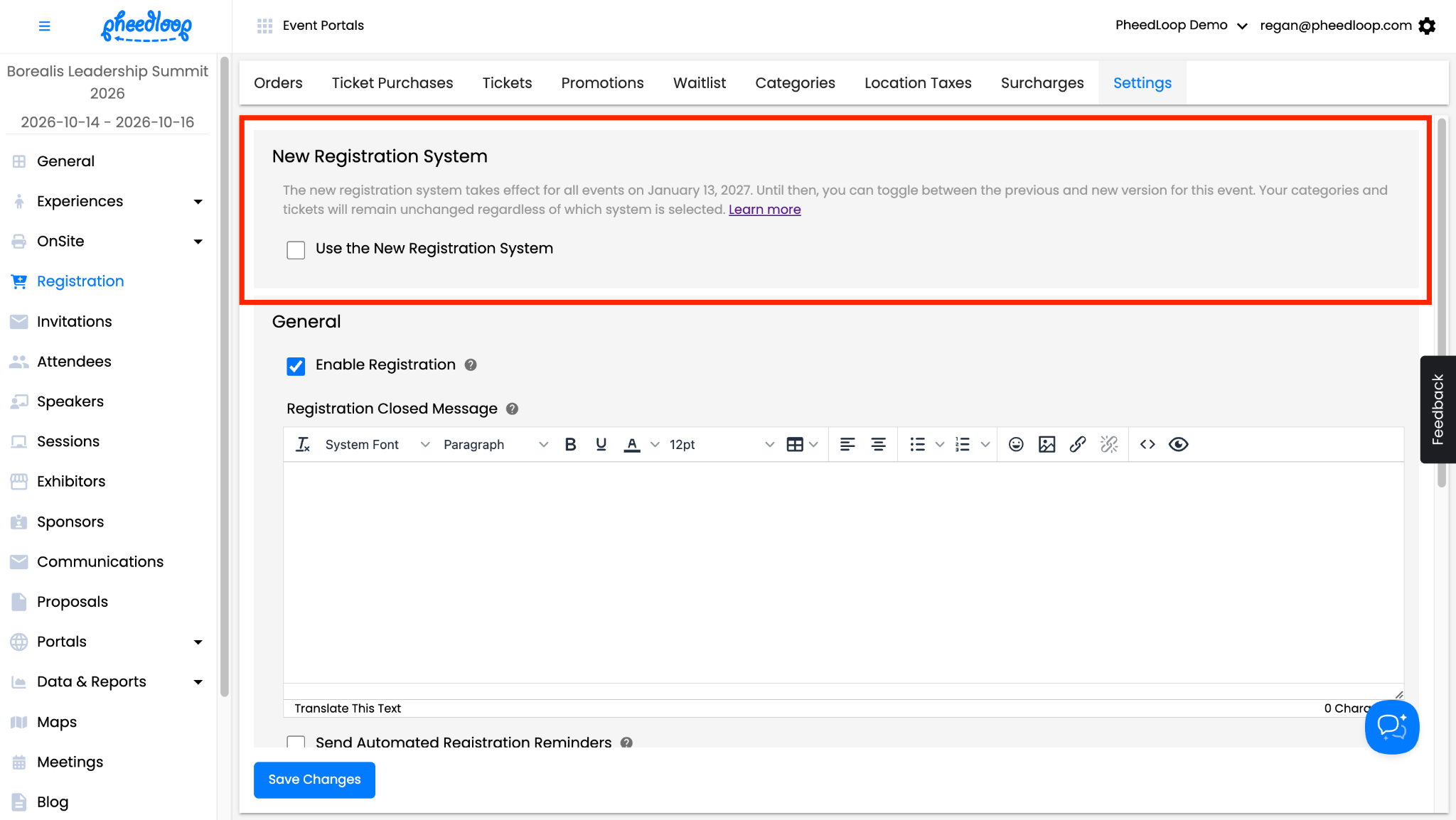
The new registration system becomes available for all new and existing events. You can opt in at any time through Registration > Settings. The new system is disabled by default, so your current registration process will remain unchanged until you choose to upgrade.
December 3, 2026 — Default for New Events
Newly created events will have the new registration system enabled by default. You can still opt out through Registration > Settings, while existing events remain opt-in and are unaffected.
Early 2027 — Legacy Registration End of Life
Starting in early 2027, the legacy registration will no longer be supported, and all events will automatically be upgraded to the new registration system. Further details will be shared once the timeline is confirmed, and advanced notice will be given to all organizers ahead of time.
What's New for Registrants
The new registration system introduces an attendee-first registration flow for group registrations, allowing registrants to select who they're registering before assigning tickets.
Attendee-First vs. Ticket-First Registration
Previous System - Ticket-First: Registrants selected all tickets in their order first, then assigned them to attendees.
New System - Attendee-First: Registrants enter each attendee's email address and profile information, then select the tickets for that attendee. They can repeat this process to add more attendees before proceeding to checkout.
This updated flow allows registrants to purchase tickets for multiple attendees without re-entering attendee details for every ticket.
What Hasn't Changed
Category selection and login remain the same, and the checkout process is unchanged. No Ticket and Ticketed Individual Category registration flows are also unaffected, as the updated ticket-assignment process applies primarily to group registrations.
What's Different for Event Planners
The new registration system has been designed to minimize changes to your existing event setup. Your Categories and Tickets remain as configured, so there's no need to rebuild or recreate them.
Updated Dashboard Settings
Pre-Fill Ticket Info: This setting under Registration > Tickets > Options is no longer available, as the new attendee-first flow removes the need to pre-fill individual ticket information.
Minimum and Maximum Ticket Limits: The per-ticket settings “Minimum Per Order” and “Limit Per Order” have been renamed to “Minimum Per Attendee” and “Limit Per Attendee,” respectively. These limits now apply to each attendee rather than the overall order.
All other dashboard settings remain unchanged, allowing you to continue managing your event with minimal disruption.
FAQs
General Overview
What is the new PheedLoop Registration System?
The new registration system introduces a cleaner, more intuitive registration experience, particularly for group registrations. It uses attendee-first logic, allowing registrants to enter attendee information before selecting tickets for each person.
What is the difference between attendee-first and ticket-first registration?
The previous system required registrants to select all tickets before assigning them to attendees. The new system allows registrants to enter each attendee's information and select their tickets individually, before adding additional attendees to their order.
Which types of registration benefit from the new system?
The updated registration flow primarily affects group registrations, where one registrant purchases tickets on behalf of multiple attendees. No Ticket and Ticketed Individual Category flows remain unchanged.
Event Transition & Timeline
Do I need to upgrade my existing events to the new registration system?
The new registration system is currently available on an opt-in basis. You can upgrade individual events through Registration > Settings whenever you're ready.
Can I upgrade one event without changing the registration system for my other events?
Yes. The new registration system is enabled on a per-event basis, allowing you to upgrade individual events without affecting other events in your account.
Do I need to recreate my registration setup when upgrading?
No. Your existing Categories and Tickets remain in place when you upgrade, so you do not need to recreate them.
How do I opt in to the new registration system?
To opt in, navigate to Registration > Settings in your Event Dashboard. At the top of the page, you'll find the New Registration System section, where you can toggle between the current and new versions for that event.
Should I update while my registration is live?
If your event is currently accepting registrations, we recommend considering your registration timeline before upgrading. The new system introduces changes to the registrant-facing experience, particularly for group registrations. If you're not ready to transition, you can continue using the current system while the update remains opt-in.
When will the legacy registration system be discontinued?
The legacy registration system is expected to reach end of life in early 2027. A confirmed date will be shared once available, along with further details about the transition.
Features & Functionality
Can registrants register themselves and other attendees in the same order?
Yes. Registrants can choose whether they're registering for themselves or others, then add multiple attendees to the same order before proceeding to checkout.
Can registrants choose which attendee to register first?
Yes. Registrants can begin with any attendee they wish to register. They can then add additional attendees to their order as needed.
Can registrants select different tickets for each attendee?
Yes. Registrants can select the tickets applicable to each attendee individually, allowing multiple attendees to have different ticket selections within the same order.
Will the checkout process change?
No. Once registrants have added their attendees and tickets, they can proceed to checkout as usual, including entering promo codes, reviewing their order, and selecting a payment method.
Dashboard Changes
Will my existing Categories and Tickets be affected?
No. Your existing Categories and Tickets will remain as configured when you upgrade, so there's no need to rebuild or recreate your registration setup.
Do I need to make any changes to my dashboard settings before upgrading?
Your existing registration setup will remain in place. However, we recommend reviewing your ticket limits to ensure they align with the updated per-attendee behaviour.
Will any other dashboard settings change?
The new registration system has been designed to minimize changes to your existing event setup. All other dashboard settings remain unchanged, allowing you to continue managing your event as usual.